
How to Use SkillWhisk for Copy-Ready AI Recipes
Learn how to use SkillWhisk to find a copy-ready AI recipe, tailor the prompt to your project, and check your first MVP build before you share it with users.
Before an AI agent writes a line of code, there’s already work to do. You need to explain what you want, pick the right tools, and decide how you’ll tell if the result works. We built SkillWhisk to put that prep in one place and give the first version of an MVP a clear quality bar.
What is SkillWhisk?
SkillWhisk is a library of 110 copy-ready AI recipes for tasks such as building websites and apps, making videos, and running security reviews. A recipe bundles a prompt, a workflow, relevant agent skills and GitHub repositories, and checks for the finished work. You customize the prompt in SkillWhisk and run it in your AI agent. Browse the SkillWhisk library
How to use SkillWhisk
1. Find a recipe for the job
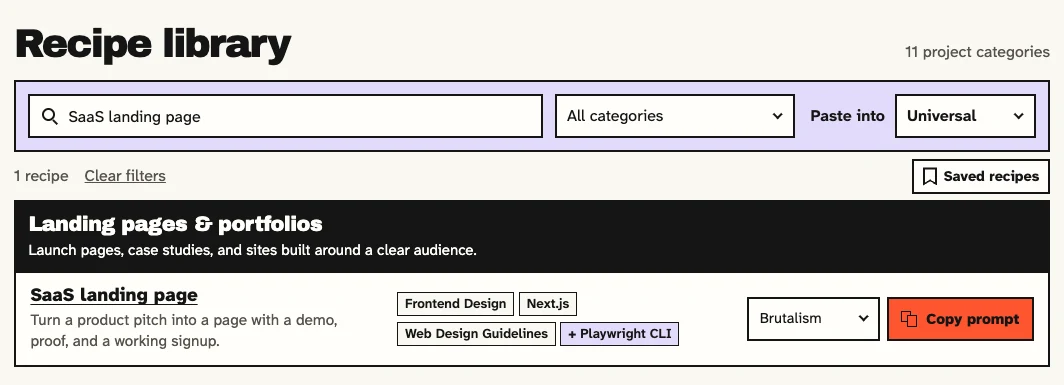
Let’s say you want a waitlist page for an invoice reminder app. In Search recipes or tools, type SaaS landing page and open the matching recipe. Open the SaaS landing page recipe
2. Add a short project brief
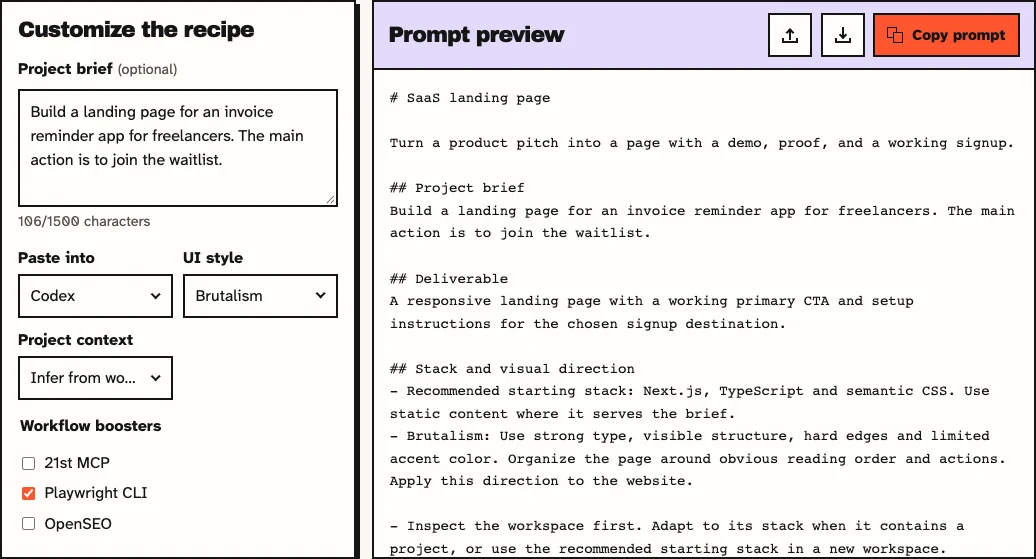
In Customize the recipe, add a Project brief. Tell the agent what to build, who it’s for, and what visitors should be able to do. Here’s the brief used in the screenshot.
Build a landing page for an invoice reminder app for freelancers. The main action is to join the waitlist.
Choose your agent under Paste into. The example uses Codex. Set a UI style and any recipe options that matter for your project. You can see the effect of those choices in Prompt preview.
3. Copy the prompt and check the result
Click Copy prompt, open your AI agent in your project folder, and paste the prompt. Skim the tool setup first so you know which skills or repositories the agent may need.
When the first build is ready, go back to the recipe’s checks. For this example, open the page on a narrow screen, try the waitlist button, and verify that a test signup reaches the intended destination. If a check fails, tell the agent what happened so it can fix that specific issue.
If you’re curious about why we built the library, read the founder’s note in the SkillWhisk case study.