How to add Beautiful Code Snippets in WordPress 2025
Learn how to add beautiful, syntax-highlighted code snippets in WordPress with copy functionality using the Prismatic plugin. Make your code blocks more engaging and user-friendly.

Illustration by Freepik Storyset
Adding code snippets in WordPress with its default widget sure does your work, but it's not pretty interesting, right? I mean that it should look beautiful, have a code theme based on different programming languages & a copy button to copy all the snippets to the clipboard.
So, today I am going to show you how to add beautiful code snippets, which would look something like this,
const beautifulSnippet = "It's pretty right?";
console.log(beautifulSnippet);
//we also have a copy button at top right corner.
It's a really great upgrade if you are using something like this,
const decentSnippet = "It's not that interesting user experience, right??";
console.log(decentSnippet);
//we also don't have a copy button.
Adding this feature is pretty easy, you don't need to have any coding knowledge, we just need to download a plugin and modify some settings, that's it. So, let's get started!
Why Syntax Highlighting Matters
If your blog teaches code, the code block is the most important element on the page — and a plain grey box does it no favours. Proper syntax highlighting colours keywords, strings, and comments so readers can scan a snippet the way they would in their own editor. A copy button removes the friction of hand-selecting multi-line code (and the errors that come with it). These small touches measurably improve time-on-page and the odds a reader actually follows your tutorial, which is exactly the engagement search engines reward.
Steps to add Code Snippets in WordPress
1. Download and Install Prismatic Plugin

You can download this plugin from wordpress.org , or simply on your WordPress dashboard, visit plugins -> add new and search -> "prismatic".
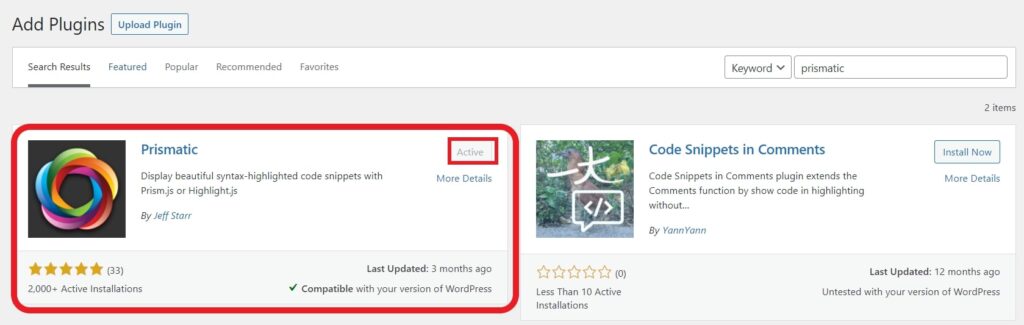
Download and Activate the Prismatic plugin.
2. Let's setup the Prism.js
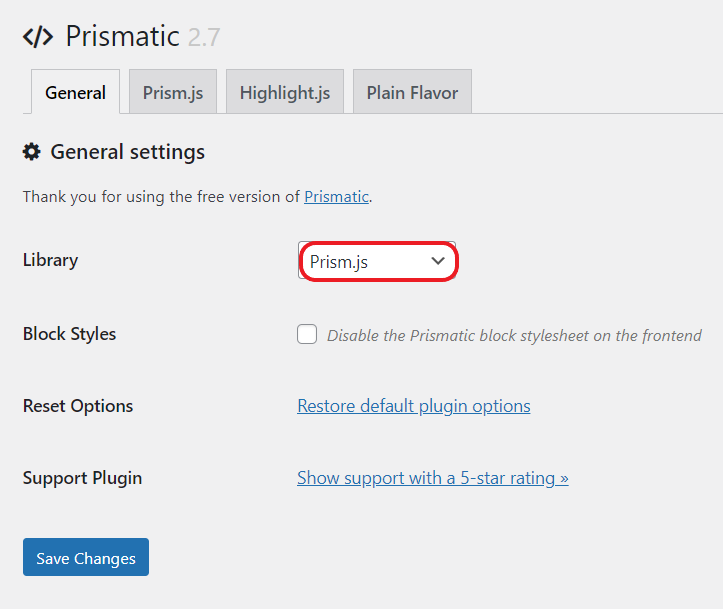
Now, head towards the Settings -> Prismatic and select library to Prism.js. You can choose between Highlight.js and Prism.js. I recommend Prismjs.
Now, let's modify some settings so you don't get any errors. Visit the Prism.js tab. Enable the settings as per the below image if you don't want any errors and want to replicate my code snippet.
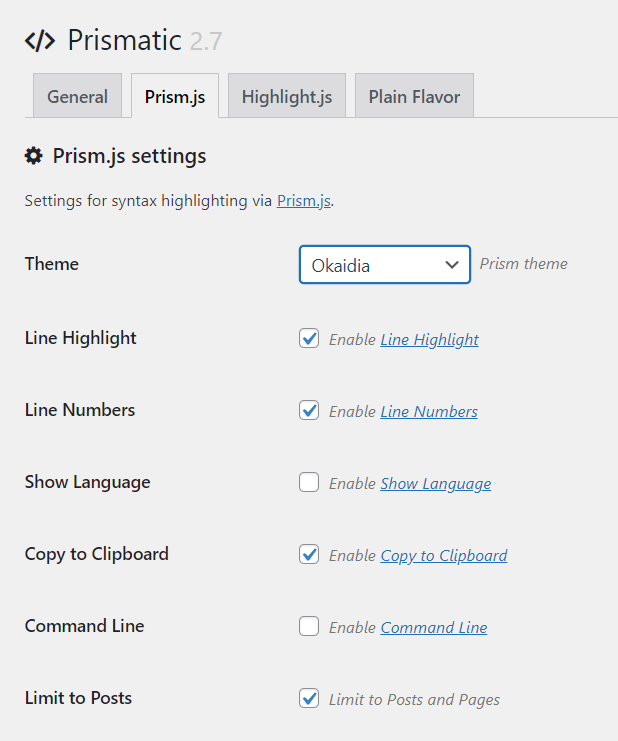
You can select any theme you want, you can also, choose to enable Show Language or Command-Line. I prefer them to deselect as they might just clutter our beautiful snippet.
Now, just need to change a last setting, so you can display HTML code without actually running(html) in code snippet.
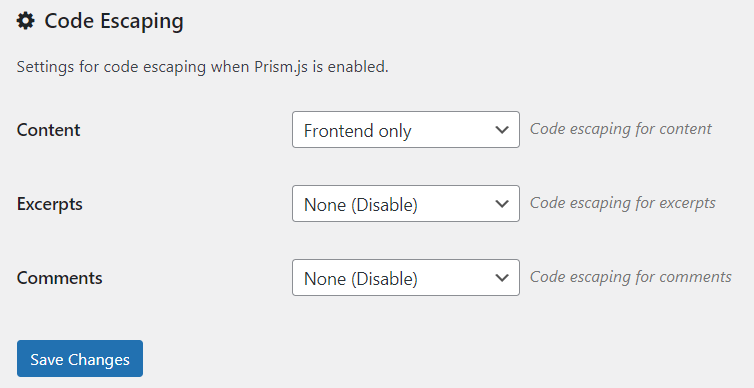
Change Code Escaping setting, Content to Frontend Only. That's all, now you are ready to use beautiful code snippets in your WordPress!
But, how to add? It's super easy!
3. Adding Code Snippet in Blog Post -
In your Blog Post, click on add new widget and search Prismatic, and now you would have a code snippet where you can paste the code you want.
To select language, select the block tab in WordPress sidebar,
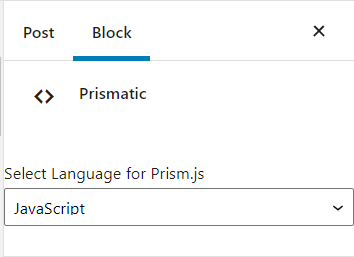
that's it! Now, enjoy and create beautiful code snippets and get your user's more interacted.
Prism.js vs. Highlight.js: Which Should You Pick?
The Prismatic plugin lets you power your snippets with either library, and both are excellent. The practical differences:
- Prism.js is lightweight and modular — you load only the languages and features you need, which keeps pages fast. Its plugin ecosystem adds niceties like line numbers, copy-to-clipboard, and line highlighting. This is why I recommend it for most blogs.
- Highlight.js auto-detects the language of a snippet, which is convenient if you paste a lot of untagged code, but it ships more weight by default.
If page speed and clean, minimal snippets matter to you, stick with Prism.js. If you value zero-config language detection above all, Highlight.js is the easier path.
Choosing a Theme That Stays Readable
A snippet exists to be read, so favour contrast over flashiness. Dark themes like Tomorrow Night or One Dark are popular and easy on the eyes, but make sure whatever you choose has clearly distinct colours for strings, comments, and keywords. Test a snippet on mobile too — themes with very light comment colours often become unreadable on small screens in bright light. Pick one theme and use it site-wide; consistency looks more professional than a different palette on every post.
Conclusion
Beautiful, copyable code snippets take about five minutes to set up with the Prismatic plugin, and the payoff in readability and reader engagement is well worth it. Install Prismatic, choose Prism.js, enable the copy button, and settle on a single high-contrast theme.
So, that's how you add code snippets in your WordPress posts, I hope it was helpful if it was making sure to share these posts with your friends!
because, "Sharing is Caring"!